
Best Brokers for TradingView in 2026: Gold, Oil & Forex
Which brokers let you trade gold, oil and forex directly from TradingView charts, how the connection works, and what to check before you pick one.
By Volodymyr Kravchenko Published Updated Data as of

Short answer
There is no single best broker for TradingView: it depends on where you live and what you trade. For gold, oil and forex CFDs, FxPro, Pepperstone, OANDA and Capital.com all connect to TradingView's Trading Panel, each through a specific account type. Check that the broker appears in TradingView from your country, which account it requires and which entity would serve you.
Key takeaways
- TradingView is only the interface: the broker holds your money and executes the order, so regulation and costs come from the broker, not from TradingView.
- Each broker connects through a specific account type — FxPro through a cTrader account, Pepperstone through a Razor account.
- The brokers TradingView shows you depend on your location and device; a broker's own site may list an integration that you cannot use where you live.
- For day trading, compare the cost model (spread only or spread plus commission) and test order entry on a demo or paper account first.
On this page 5 sections
AdTrade from TradingView charts with FxPro
FxPro connects to TradingView through a cTrader account. Check availability in your country and the current terms on FxPro's site.
Explore FxProDisclosure: Some links on this website are affiliate links. If you use them, we may receive compensation at no additional cost to you. This does not determine our editorial analysis, reviews or comparisons.
Trade responsibly. CFDs are complex instruments and come with a high risk of losing money rapidly due to leverage. Your capital is at risk.
Brokers that connect to TradingView (gold, oil, forex)
Checked on 27 September 2026 against each broker’s own TradingView page or help article. Listed alphabetically, not ranked. VERIFY CURRENT DATA before you open an account.
| Broker | Account used with TradingView | Gold / oil via TradingView | TradingView plan note | Relationship with Marlin |
|---|---|---|---|---|
| Capital.com | Capital.com account, connected via an authorisation pop-up | Not stated on the connection page — VERIFY | Not stated | None |
| FxPro | FxPro cTrader account; one connected at a time | Metals and commodities listed in TradingView’s announcement | Connection is free (FxPro) | Affiliate partner |
| OANDA | OANDA account; TradingView guides for several OANDA entities | Precious metals and commodities (2017 announcement) — VERIFY current list | Not stated | None |
| Pepperstone | Razor account only (not Standard) | Spot gold stated; oil not stated — VERIFY | Pepperstone offers a free TradingView subscription, with eligibility criteria | None |
What the table does not tell you
- Regulation depends on where you live. Each of these brokers operates through several companies, and the one you sign up with depends on your country of residence.
- FxPro, for example, lists FCA (509956) and SCB (SIA-F184) licences on its licences page, and the CySEC register shows FxPro Financial Services Ltd (078/07). The FxPro review has the details.
- For the other brokers, check the regulation page for your country on their own sites.
- Costs differ by account. Pepperstone, for example, states that its Razor pricing on TradingView starts from 0.0 points on forex and 0.08 points on spot gold, plus a commission from USD 3.50 per lot per side. That figure applies to the entity whose page we read (Pepperstone Markets Limited, Bahamas). VERIFY CURRENT DATA for your entity.
- Availability in TradingView varies by country. On 27 September 2026, from a US connection, TradingView’s broker directory showed US brokers in its forex section (FOREX.com, OANDA, tastyfx) and none of the other CFD brokers in the table. CFDs are not available to US retail traders, so US clients of those brokers trade spot forex rather than CFDs. Always confirm in the Trading Panel from where you live.
How the TradingView connection works
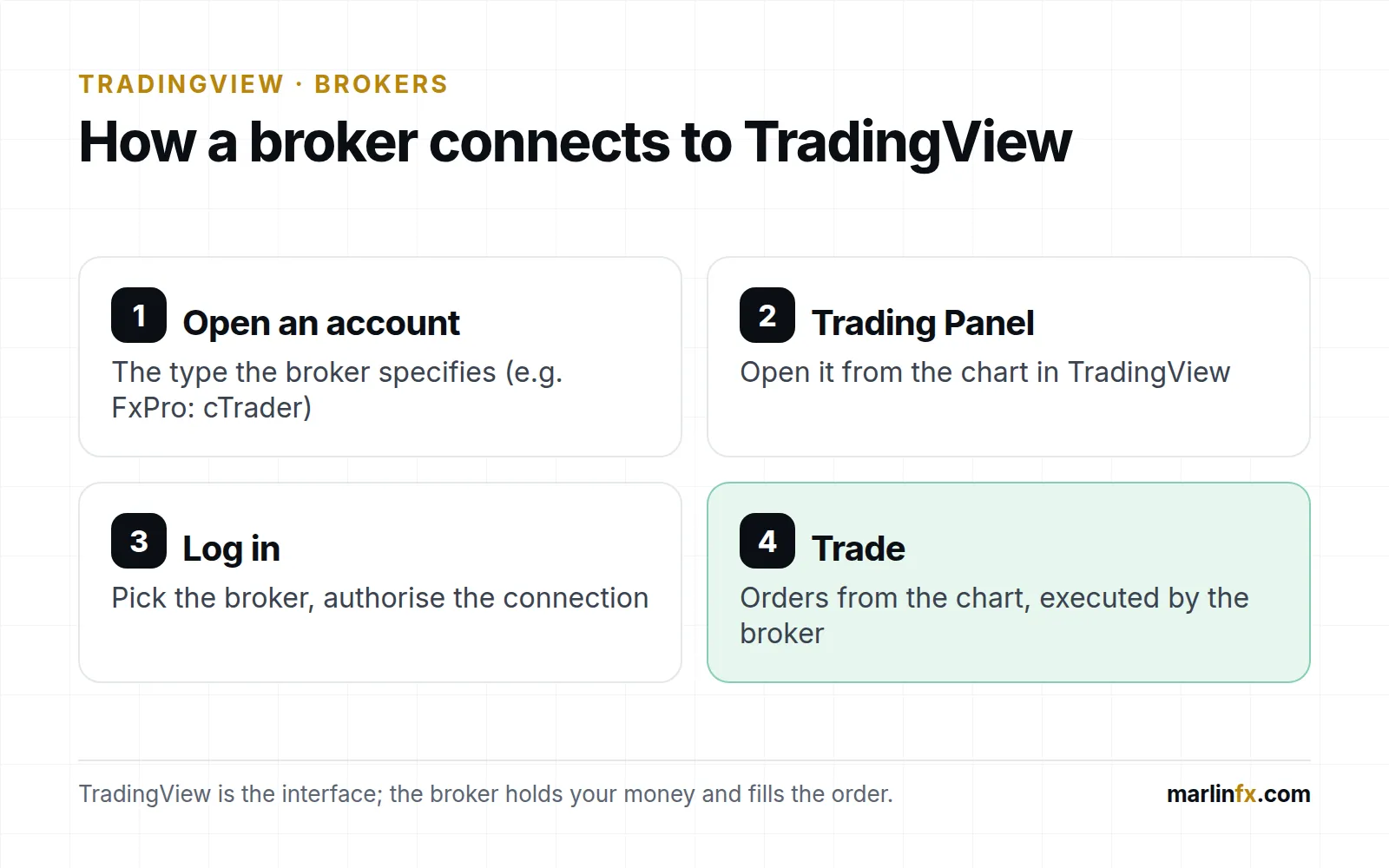
How a broker account connects to TradingView’s Trading Panel.
- Open an account with the broker. Use the account type the broker specifies (FxPro: cTrader; Pepperstone: Razor).
- In TradingView, open the Trading Panel. Use the Trade button at the top of the chart, or the panel at the bottom.
- Choose the broker and log in. You authorise TradingView to send orders to that broker account.
- Trade from the chart. Place orders from the order ticket or directly on the chart. Positions and fills are the broker’s; TradingView only shows them.
TradingView recommends starting with paper trading. Use it to check order entry, stop placement and position size before risking money. Our position size calculator helps with the last one for gold, oil and forex.
Choosing a broker for day trading on TradingView
For frequent intraday trading, these matter more than the brand:
- Cost per round trip. Compare spread plus commission on the instruments you actually trade (XAUUSD, WTI, EUR/USD), not the “from” figures.
- Chart trading on your device. TradingView notes that some brokers reach its mobile apps later than desktop. If you trade from a phone, test on the phone.
- Behaviour around news. Spreads can widen sharply at releases like US jobs data, CPI or the weekly EIA oil report. Check the economic calendar before the session. If you trade a funded account, check the prop firm news trading rules too.
- Leverage and protection. Under UK and EU rules, retail CFD accounts have leverage caps and negative balance protection. Offshore entities may not offer the same protections.
TradingView or MetaTrader?
If you are still deciding between platforms rather than brokers, read TradingView vs MetaTrader 5. Our TradingView guide covers the charting features. Many traders analyse on TradingView and execute on the broker’s own terminal; connecting a broker simply removes that extra step.
Our view
Opinion. For gold and oil traders who already chart on TradingView, the practical choice comes down to two things:
- which of these brokers you can actually connect from your country;
- whose account type and costs fit how often you trade.
Start on paper trading, confirm the broker and entity that would serve you, and only then fund an account.
How this was prepared
Checked 27 Sep 2026
We checked TradingView's help centre and broker page, and each broker's own TradingView page or help article, on 27 September 2026. We list only brokers whose official pages state a TradingView integration for CFDs on gold, oil or forex, in alphabetical order. There are no scores or rankings. We have not opened funded accounts with these brokers, so execution quality is not assessed. FxPro and TradingView are Marlin affiliate partners; Pepperstone, OANDA and Capital.com are not. Facts are separated from analysis and opinion; anything that could not be verified against a current source is marked VERIFY CURRENT DATA. Read the full methodology and editorial policy.
Sources (8)
ShowHide
Official or primary sources used for the facts above. Figures and terms change, so check the source before acting on them.
- TradingView — How to trade on TradingViewTrading Panel, list of licensed brokers, paper trading; TradingView acts as an interface only.Accessed
- TradingView — I can't choose my broker in the AppNot all brokers are available in the mobile apps or mobile web at first.Accessed
- TradingView — BrokersBroker directory; the list shown depends on the visitor's location.Accessed
- TradingView — Trade with FxPro directly on TradingViewAnnouncement dated 19 November 2025: forex, indices, commodities, metals and crypto.Accessed
- FxPro — TradingView — FAQcTrader account required, free to connect, one cTrader account connected at a time.Accessed
- Pepperstone — Trade with TradingViewRazor account only; stated pricing and TradingView subscription offer (Pepperstone Markets Limited, SCB page).Accessed
- OANDA — TradingView user guide (OANDA Global Markets)OANDA's guide to trading from TradingView; OANDA has offered the integration since 2017.Accessed
- Capital.com — How to connect Capital.com to TradingView?Connection through the Trading Panel and an authorisation pop-up.Accessed
Frequently asked questions
Can you trade directly on TradingView?
Yes, through a connected broker. You open the Trading Panel (the Trade button), choose a broker from the list and log in with that broker's account. TradingView passes the order to the broker; it does not execute trades or hold funds itself. You can also practise with TradingView's paper trading first.
Do I need a paid TradingView plan to trade with a broker?
FxPro states that connecting an FxPro account to TradingView is free, while TradingView's paid plans add features such as more indicators per chart and more alerts. Check the current plan limits on TradingView's pricing page before you decide.
Which FxPro account works with TradingView?
According to FxPro, TradingView works with FxPro cTrader accounts. You open a cTrader account in FxPro Direct and then connect it in TradingView's Trading Panel. Only one FxPro cTrader account can be connected at a time.
Why can't I see my broker in TradingView?
The brokers TradingView offers depend on your location and device. TradingView notes that not all brokers are available in its mobile apps or mobile web straight away. If a broker lists a TradingView integration on its own site but you cannot find it, check on desktop and ask the broker whether its integration covers clients in your country.
What is the best broker for day trading on TradingView?
It depends on your costs and markets. For frequent trading, compare the full cost per round trip (spread plus any commission) on the instruments you trade, check that the broker is available in TradingView where you live, and test chart trading on a demo or paper account before trading real money.
What about futures on TradingView?
Futures on TradingView are traded through specialist futures brokers, mostly for US clients. This guide covers CFDs on gold, oil and forex; Marlin does not review futures brokers.
AdExplore TradingView
Charts, alerts and the Trading Panel. Compare the free and paid plans on TradingView's site before choosing one.
Explore TradingViewDisclosure: Some links on this website are affiliate links. If you use them, we may receive compensation at no additional cost to you. This does not determine our editorial analysis, reviews or comparisons.
Written by
Volodymyr KravchenkoIndependent market researcher focused on Forex, Gold, commodities, macroeconomic data and AI-powered financial intelligence.
- Forex, gold and oil market research
- Macroeconomic data analysis
- Search-data and SEO analysis
- Website and data-tool building
Educational research, not personal advice. See our editorial policy and methodology.
This content is provided for educational purposes only and is not investment advice. Trading involves risk, and past performance does not guarantee future results. Affiliate relationships may exist. Always conduct your own independent research before making financial decisions.
Related articles

Best CFD Brokers & Trading Platforms in 2026: How to Choose
CFD brokers for gold, oil and forex compared: who regulates each one, which platforms they offer, and what changes if you live in the UK, EU or UAE.
Read analysis
Best Gold Trading Brokers: How to Choose in 7 Checks
No single best gold broker. Seven checks for XAUUSD: regulation, costs, hours, platform, margin, funding and protections, plus the brokers we reviewed.
Read analysis
MT4 vs MT5 vs cTrader: Which Trading Platform Should You Use?
MetaTrader 4, MetaTrader 5 and cTrader compared: the differences that matter, who each platform suits, and how to choose for forex, gold and oil.
Read analysis